



Snapchat is now one of the most used social applications in the world – particularly among teenagers and young adults. It has fun filters, disappearing messages, and Bitmoji avatars, which make it possible to learn something new all the time.
A small green dot is one of the symbols that you can encounter when you scroll through your chats or friend suggestions. But what does the green dot mean on Snapchat, why does it show up, and how can it affect your experience? Let’s break it down in a way that’s easy to understand.
Understanding Snapchat’s Activity Indicators
To begin with, it is better to understand that Snapchat uses numerous icons to inform you about your friends and their activity:
- Snapchat Ghost: The application icon and the home page.
- Smiley and Emojis: Have varying degrees of friendship and interactions.
- Snapstreak Fire: Shows consecutive daily interactions of snaps.
- Green Dot: This is what we are targeting today.
Every symbol adds additional background to your Snapchat communications – and the green dot is not an exception.
What Is The Green Dot On Snapchat?
What is the meaning of the green dot on Snapchat then? In other words, it is the activity indicator of Snapchat. When you see a green dot beside a person in the app next to their Bitmoji, username or suggested friend, it usually indicates that they have been using Snapchat recently.

This does not necessarily imply that they are chatting to you, it is simply to inform you that they have opened Snapchat, watched something or otherwise used the app in the recent past. Imagine that it is a sort of a hint on who may be available to respond to messages.
Where The Green Dot Appears
The green dot is not everywhere in Snapchat. Rather, it tends to manifest itself in certain locations:
- Beside the Bitmoji or profile picture of a friend who has been active.
- On lists such as Quick Add or friend suggestions – which list the users who have recently used Snapchat.
- In addition to names in the search results when individuals have just opened the app.
It does not always look like that in real chat conversations, notice. That is because Snapchat does not have an online status within messages as others do. The green dot is not a real-time presence but more of recent activity.
Does The Green Dot Mean They’re Online Right Now?
This is among the most frequent questions that are posed. The answer to this is not necessarily in the affirmative.
The green dot indicates that a person has been very recent, and is usually within the last few minutes or hours, although it is not necessarily an exact real time indicator. In most instances, it can be shown by Snapchat in the short run even after the individual shuts the application. It is reported to last up to 3-5 minutes after a person has left or even 24 hours in case of recent activity.
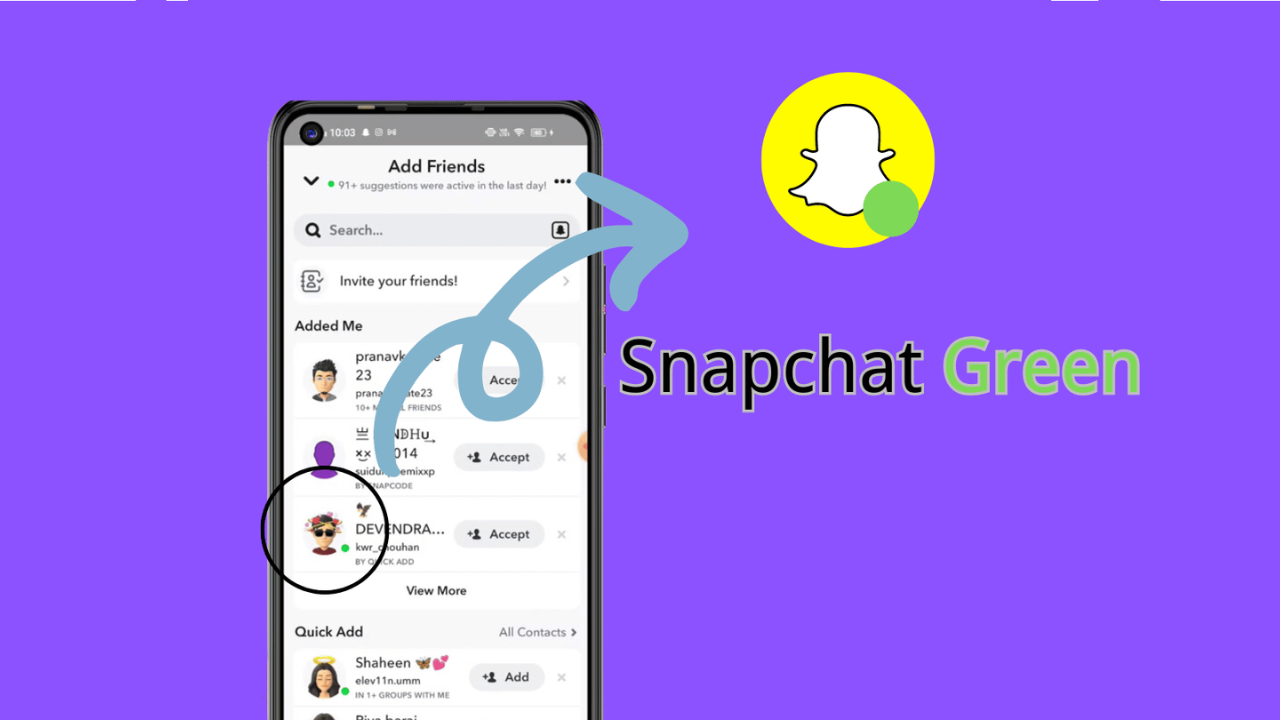
Therefore, the presence of a green dot does not mean that a person is using their phone and is ready to respond. It implies that they have used Snapchat in the recent past and may not be gone yet.
Why Snapchat Uses The Green Dot
The green dot feature is one of the additions to Snapchat, which strived to make the connections more realistic and interactional. Here’s why it matters:
- Improved communication: When a person is on Snapchat, there is a chance that he/she will reply to your message quicker.
- Friend suggestions: Snapchat will suggest users who are currently active so that you can increase your network.
- Engagement boost: It is possible to know who is online and talk to them more.
One should keep in mind that this is not liked by all people. There are individuals who like more privacy and do not want other people to know their activity.
Read Also: How to solve “retrieving data. wait a few seconds” and try to cut or copy again.
Can You Turn Off The Green Dot?
Yes, you can. Snapchat provides the option of whether you want people to know your activity status or not.
In order to turn off your activity indicator (green dot) take the following general steps:
- Open Snapchat and tap your profile either by tapping your Bitmoji or the profile icon.
- Tap the Settings gear icon.
- Click on Privacy Controls.
- Tap on Activity Indicator.
- Toggle it off.
In this way, other individuals will not notice a green dot beside your name when you are online. Only remember that by disabling it, you will not see the green dots of other people either – Snapchat connects these options.
Final Word
What does the green dot mean on Snapchat? It is an in-built activity tracker that indicates that a user has been active in the app recently. It will be placed next to Bitmojis or recommended friend names and will provide you with a clue as to who is online or can chat with you.
You can use it to determine when to send a message to somebody or simply keep your status hidden to keep it private, however, knowing this little detail can make your Snapchat experience more deliberate and enjoyable.
FAQs
1. But what is the meaning of the green dot on Snapchat?
It demonstrates that a person has been busy or just used Snapchat at all, and not necessarily that he/she is speaking to you at this very moment.
2. What is the duration of the green dot in Snapchat?
The green dot may remain visible during several minutes once one is out of the app and recent activity can be visible during 24 hours.
3. Is the green dot necessarily an indication that somebody is online at the moment?
No, not necessarily, it means that something was done recently, but it does not mean that they are using the app at the moment.
4. Is it possible to switch off the green dot in Snapchat?
Yes, in the privacy settings of Snapchat, you can switch off the Activity Indicator so that other people do not know when you are active.
5. Will switching off my green dot make all other people have their green dot off?
On Snapchat, you can see other people in most instances, so when you switch off your activity indicator, you may not see the green dots of other people as well.
Read More: Is 2579xao6 Easy to Learn? Beginner Guide and Tips
